
Many drone pilots have experienced the same frustrating situation:
A battery is left unused for several weeks or months. When it is taken out again, it will not charge. Pressing the power button produces no indicator lights. The charger does not recognize it, and the drone cannot detect it.
In the drone community, this is often described as a “locked battery,” “deep-sleep battery,” or “starved battery.”
Because an original intelligent drone battery can cost hundreds of dollars, immediately discarding it feels wasteful.
However, in many cases, the battery cells are not completely dead.
Instead, the internal Battery Management System, or BMS, has detected an unsafe condition and intentionally disconnected the charging and discharging circuits.
Understanding why this happens is essential for preventing avoidable battery loss and protecting flight safety.
What Is a Battery Management System?
A Battery Management System is the electronic control system built into an intelligent battery pack.
It continuously monitors the condition of the battery and decides whether charging or discharging should be allowed.
The intelligence of a DJI battery comes primarily from this internal BMS board.
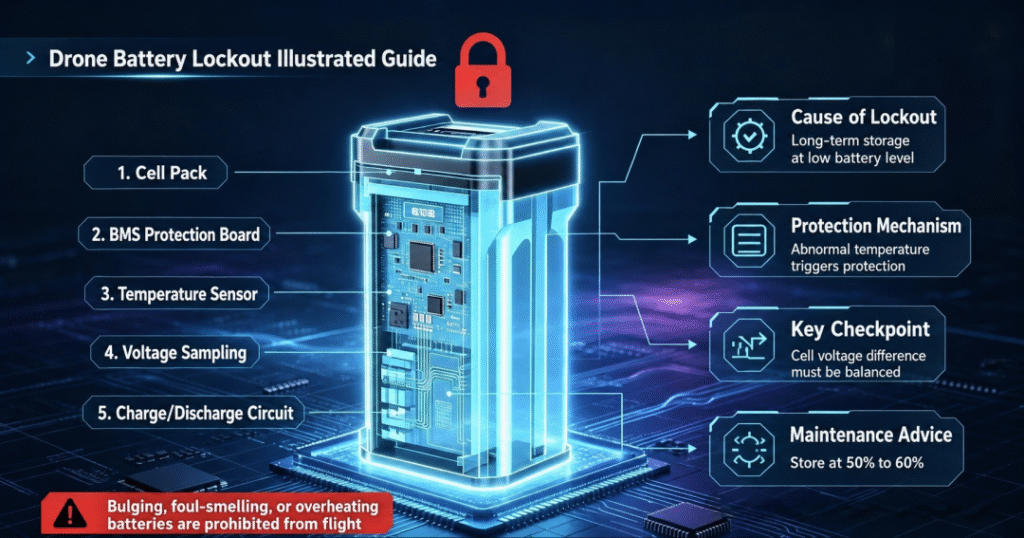
A typical intelligent drone battery contains three main parts:
- The cell group Usually several lithium-ion or lithium-polymer cells connected in series.
- The BMS control board This includes voltage-measurement circuits, temperature sensors, MOSFET switches, memory components, and protection logic.
- Charging, discharging, and communication interfaces These allow the battery to communicate with the charger, aircraft, and flight application.
The BMS performs four core functions:
- Voltage protection
- Temperature protection
- Current protection
- Battery-state management
If the system detects an unsafe condition, it may disconnect the battery output or block charging.
This leads to an important distinction:
A locked battery does not automatically mean the cells are completely damaged. It often means the BMS has decided that allowing normal operation would be unsafe.
The Four Main Causes of Battery Lockout
1. Deep Discharge During Storage
Deep discharge is one of the most common causes of intelligent battery lockout.
Lithium batteries continue to consume a small amount of energy while stored because of:
- Natural self-discharge
- BMS standby consumption
- Internal chemical reactions
- Temperature-related leakage currents
Many DJI intelligent batteries include an automatic storage-discharge function. When a battery remains unused for a defined period, it gradually reduces its charge level toward a safer storage range.
However, this function cannot protect a battery that was already stored at a very low state of charge.
For example, if a battery is placed in storage at 15% or 20%, it may continue losing energy until one cell falls below the BMS undervoltage threshold.
At that point, the BMS may enter deep-sleep or protection mode.
Typical symptoms include:
- No indicator lights
- No response when the button is pressed
- The charger cannot recognize the battery
- The aircraft cannot detect the battery
- The flight application shows no battery information
In some light-protection cases, communication may remain active and the application may display a battery warning. In more severe cases, the pack appears completely dead because the BMS has disconnected the external circuit.
Can It Be Recovered?
Under professional conditions, some deeply discharged batteries can be inspected, carefully rebalanced, and have their protection status reset.
However, this must be approached with caution.
Resetting the BMS only restores the electronic control path. It does not repair:
- Lithium plating
- Copper dissolution
- Internal cell damage
- Increased self-discharge
- Capacity loss
- Elevated internal resistance
Any recovered battery should be tested for:
- Individual cell voltage
- Cell voltage difference
- Internal resistance
- Self-discharge
- Temperature rise
- Swelling or deformation
A swollen, damaged, leaking, or mechanically compromised battery should not be returned to flight service.
2. Excessive Cell Imbalance
A multi-cell battery pack depends on every series-connected cell remaining within a similar voltage range.
Over time, cells age differently because of small variations in:
- Capacity
- Internal resistance
- Temperature exposure
- Self-discharge
- Manufacturing consistency
- Charging history
As the battery ages, one cell may charge faster or discharge earlier than the others.
If the cell-voltage difference becomes too large, the BMS may classify the pack as unbalanced and activate protection.
This is more common in batteries with:
- High cycle counts
- Long storage periods
- Frequent deep discharge
- Repeated high-current use
- Poor temperature management
Cell imbalance reduces more than flight time.
It also creates a safety problem because the weakest cell determines the usable capacity of the entire pack.
During charging, one cell may reach the upper-voltage limit first.
During flight, another may reach the low-voltage threshold earlier.
The BMS therefore protects the whole battery based on the weakest cell.
3. Temperature Protection
Intelligent drone batteries are highly sensitive to temperature.
Charging a lithium battery when it is too cold can cause lithium plating on the anode. Charging immediately after high-temperature flight can accelerate electrolyte degradation and increase safety risk.
According to the limits commonly used for DJI intelligent batteries, charging is normally permitted within a moderate temperature range, while discharge may be allowed across a somewhat wider range.
Temporary temperature protection may occur when:
- A cold battery is charged immediately after outdoor winter use
- A hot battery is connected to the charger directly after flight
- The battery has been left inside a hot vehicle
- A temperature sensor detects an abnormal reading
Unlike severe undervoltage lockout, temperature protection is often temporary.
Once the battery returns to a suitable temperature, normal charging may resume.
The safest practice is simple:
- Allow cold batteries to warm gradually before charging
- Allow hot batteries to cool naturally
- Do not heat or cool batteries rapidly
- Never charge batteries in direct sunlight or inside a sealed vehicle
4. Firmware or Communication Faults
Intelligent batteries contain embedded software and stored operating data.
In rare cases, abnormal behavior may result from:
- Interrupted firmware updates
- Communication errors
- Long-term inactivity
- Corrupted stored data
- Internal memory faults
- Connector contamination
Possible symptoms include:
- Repeated connection and disconnection
- Battery not recognized by the aircraft
- Incorrect charge indication
- Firmware mismatch warnings
- Inability to complete charging
In some cases, reconnecting the original charger, reinstalling the battery, cleaning the communication contacts, or refreshing firmware through compatible DJI software may restore normal operation.
However, repeated communication failure should not be ignored.
If the BMS cannot reliably communicate with the aircraft, the flight controller may not receive accurate information about:
- Remaining capacity
- Cell voltage
- Temperature
- Battery health
- Emergency warnings
That makes the battery unsuitable for safe flight until properly diagnosed.
Seven Practical Ways to Prevent Battery Lockout
1. Store Batteries at a Moderate Charge Level
For long-term storage, avoid leaving the battery completely full or nearly empty.
A charge level of approximately 50% to 60% is generally suitable for storage.
This reduces stress from prolonged high voltage while leaving enough energy to prevent deep discharge.
2. Check Stored Batteries Regularly
Do not place batteries in storage and forget about them for six months.
During long periods without flying, inspect the battery approximately once a month.
Check:
- Charge level
- Physical condition
- Swelling
- Connector cleanliness
- Response of the indicator lights
If the charge level has fallen too low, recharge it to the storage range.
3. Avoid Repeated Deep Discharge
Do not wait until the aircraft reaches the final emergency warning before returning.
For most flights, begin return planning while sufficient reserve energy remains.
Landing with approximately 20% to 30% remaining capacity, depending on mission conditions, provides a safer reserve and reduces stress on the weakest cell.
Repeated deep discharge accelerates:
- Capacity loss
- Internal-resistance growth
- Cell imbalance
- BMS undervoltage events
4. Let Batteries Reach a Safe Temperature Before Charging
After winter flight, allow the battery to warm gradually indoors before charging.
After summer operation, allow the battery to cool fully.
A battery that feels hot should not be charged immediately.
Temperature stabilization protects both the cells and the BMS.
5. Use Compatible Charging Equipment
Original or officially compatible charging equipment is designed around the battery’s communication protocol, voltage limits, and charging logic.
Low-quality third-party chargers may create problems such as:
- Incorrect charge termination
- Poor current control
- Temperature-management mismatch
- Communication errors
- Increasing cell imbalance
Saving money on a charger can become expensive if it damages several intelligent batteries.
6. Store Batteries in a Dry, Cool, Ventilated Place
A suitable storage environment should be:
- Dry
- Cool
- Away from direct sunlight
- Free from metal objects
- Well ventilated
- Protected from physical impact
A temperature range around 15°C to 25°C is generally favorable for long-term storage.
Avoid leaving batteries inside cars, especially during summer. Vehicle interiors can reach temperatures that rapidly accelerate battery aging.
7. Number Batteries and Track Their History
For users with several batteries, each pack should be numbered and tracked separately.
Record:
- Purchase date
- Cycle count
- Flight hours
- Abnormal warnings
- Temperature events
- Capacity decline
- Cell-voltage difference
Do not assume all batteries age at the same rate.
New and heavily aged batteries should not be treated as equivalent assets in the same mission plan.
Occasional full charge and controlled discharge may also help recalibrate the BMS capacity estimate, but this should not be confused with intentionally deep-discharging the battery to zero.
Why DJI’s BMS Strategy Appears Conservative
Some users become frustrated when an intelligent battery refuses to charge or power on.
However, the BMS is designed according to a safety-first principle.
Its purpose is not to maximize the number of times a questionable battery can be used.
Its purpose is to prevent a potentially unsafe battery from entering flight.
For a ground device, a sudden battery failure may cause inconvenience.
For a drone, it may cause:
- Aircraft loss
- Payload damage
- Property damage
- Injury
- Mission failure
Therefore, a conservative protection strategy is reasonable.
A battery lockout is not necessarily a defect in the BMS.
It may be evidence that the BMS is doing exactly what it was designed to do.
Should a Locked Battery Be Repaired?
The correct answer depends on the condition of the cells.
Professional diagnosis may be reasonable when:
- The battery is relatively new
- There is no swelling
- The enclosure is undamaged
- Cell voltages remain recoverable
- Internal resistance is acceptable
- The pack has not been exposed to water or fire
Continued use is not recommended when:
- The battery is swollen
- The casing is cracked
- One cell has abnormally high self-discharge
- Cell imbalance remains severe
- The battery overheats
- Internal resistance is excessive
- Communication remains unstable
- The battery has suffered impact damage
Even if a damaged battery can be made to power on again, that does not mean it is safe to fly.
Final Thoughts
Most intelligent battery lockouts are not random.
They are usually linked to:
- Deep-discharge storage
- Cell imbalance
- Temperature extremes
- Firmware or communication abnormalities
- Poor maintenance habits
The good news is that many of these situations are preventable.
A well-maintained intelligent drone battery can remain useful for years. A poorly stored battery may become deeply discharged and locked within a much shorter period.
The key lessons are simple:
Store batteries at a moderate charge level.
Inspect them regularly.
Avoid deep discharge.
Respect temperature limits.
Use proper charging equipment.
And never prioritize recovering the purchase price of a battery over flight safety.
A locked battery may sometimes be recoverable.
But a battery with damaged cells should never be trusted in the air.
#DroneBattery #DJIBattery #BatteryManagementSystem #BMS #DroneMaintenance #LithiumBattery #DroneSafety #BatteryStorage #UAV #SmartBattery #BatteryCare #DroneTechnology